Now Playing Area
Mobile
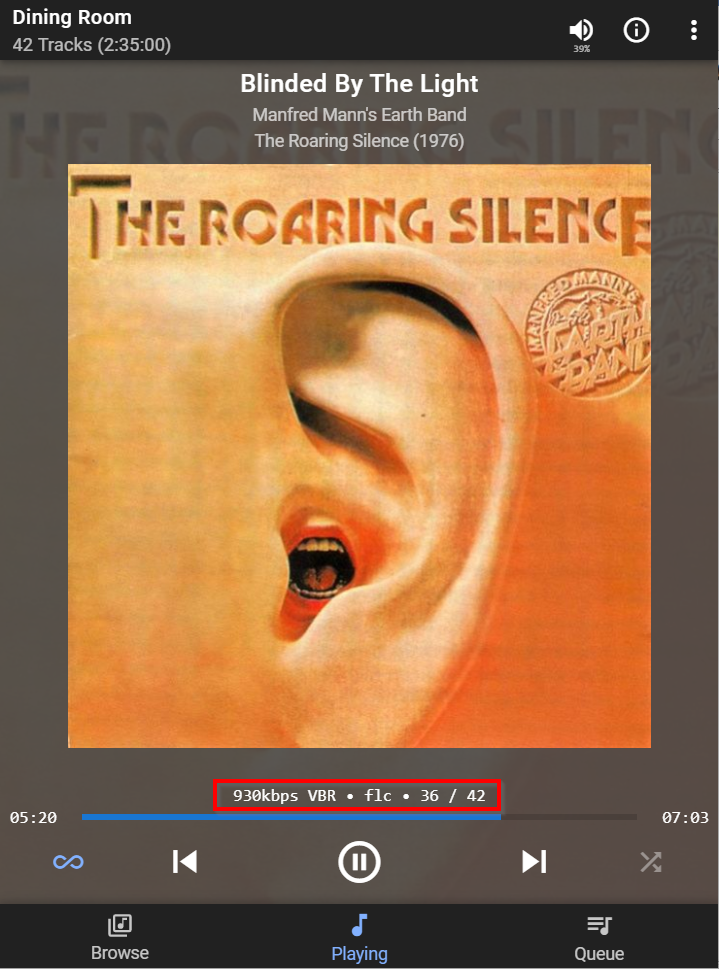
Track attribute display can be enabled / disabled via Material Settings
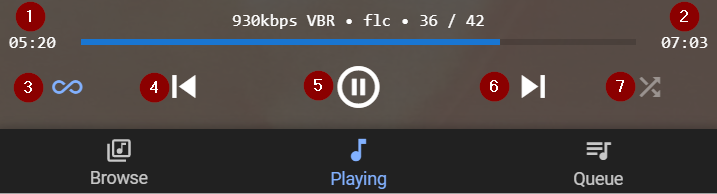
- Track elapsed time.
- Track duration.
- This indicates that Don't Stop The Music is enabled for this player. If disabled it is replaced with a Repeat icon.- see also Long Press
- Play previous track in Queue - see also Long Press
- Play / Pause - see also Long Press
- Play next track in Queue - see also Long Press
- Shuffle on (blue) /off (grey) - shown in off (grey) state.
3,4,5 & 6 - see also Long Press
Desktop

- Play previous track in Queue - see also Long Press
- Play / Pause - see also Long Press
- Play next track in Queue - see also Long Press
- Track playing - normally Track, Artist * Album but can be configured to display Composer and/or Conductor via Plugin Settings
- Track attribute display can be enabled / disabled via Material Settings
- Drag slider to jump back / forward in track
Created with the Personal Edition of HelpNDoc: Easily create EBooks